Prepare a customs-ready international shipment invoice and download a professional PDF
Data remains in this browser tab. Confirm customs requirements with your carrier or broker.
| Description / Origin / HS | Qty | Weight | Unit | Amount |
|---|---|---|---|---|
| Sample product US · 0000.00 | 10 | 5 kg | $25.00 | $250.00 |
This commercial invoice generator helps exporters, ecommerce sellers, wholesalers, and small businesses document an international sale for shipping and customs review. Enter exporter and consignee details, invoice reference, currency, package count, product descriptions, countries of origin, HS codes, quantities, unit values, weights, discount, tax, freight, reason for export, Incoterms, and an exporter declaration. The document calculates merchandise value and produces a clean PDF through the browser print dialog. Unlike a proforma invoice, which describes a proposed transaction, a commercial invoice normally reflects goods that have been sold and are being shipped. Customs requirements vary by country, carrier, product, and shipment type, so treat this free form as a preparation tool and confirm required fields, classification, valuation, tax, signatures, and declarations with the carrier or customs broker. Information stays in the current browser tab and is not uploaded or stored.
Ten products at $25 each create a $250 merchandise subtotal. A 10% discount reduces the merchandise amount to $225.
With $30 freight and no order tax, the document total is $255. Confirm whether customs value includes freight in the destination country.
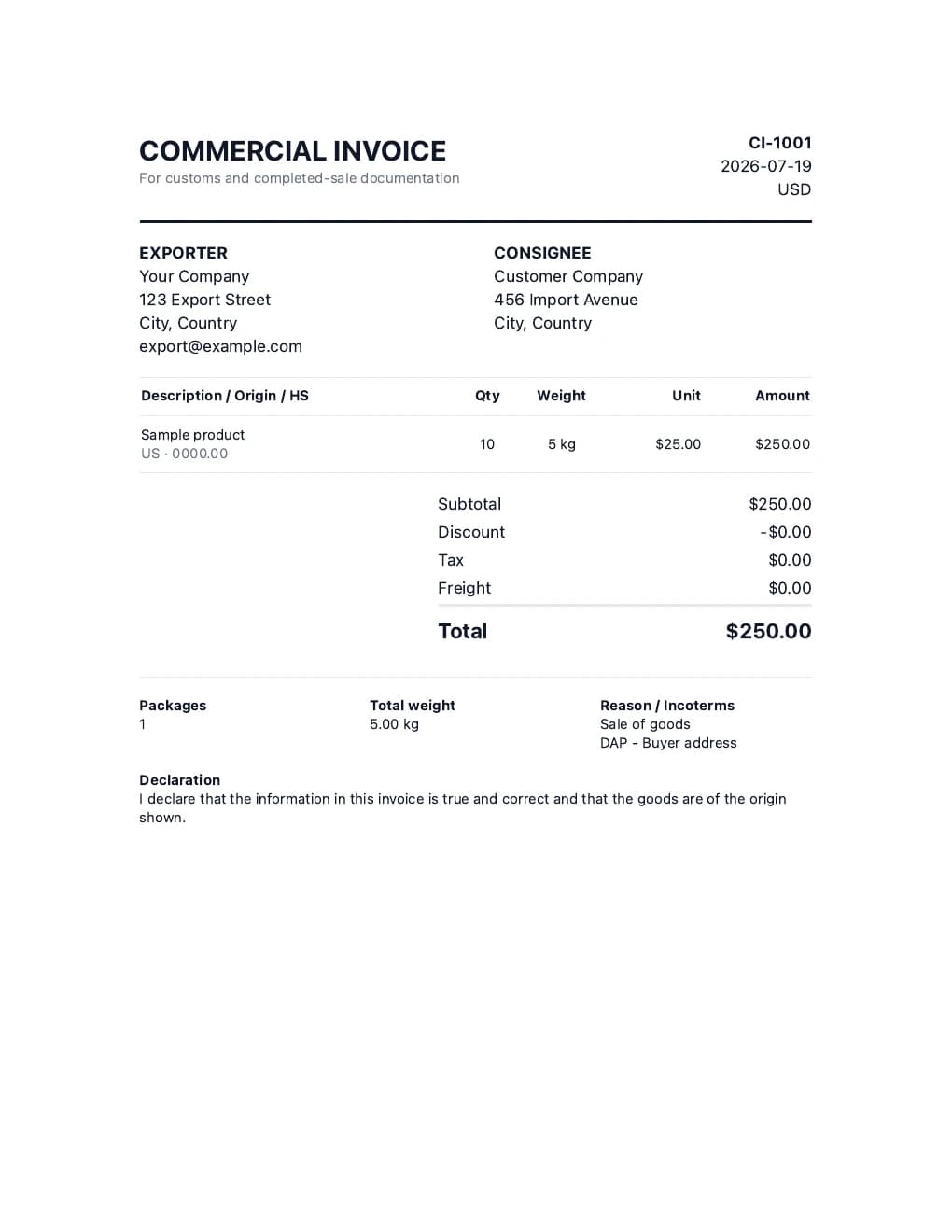
A customs invoice must identify the parties, describe and value the goods, and explain the shipment clearly enough for a carrier or authority to review. The generator totals line values, subtracts the order discount, calculates optional tax on discounted merchandise, and adds freight. It does not choose an HS code, determine customs value, calculate import duty, or decide whether freight is taxable. Those decisions depend on the destination and transaction.
Enter the seller or exporter and the buyer or consignee using names and addresses that match the shipment and business records. Add contact details when the carrier requires them. The consignee may differ from the party paying the invoice, so verify the actual delivery and import arrangement.
Use a unique commercial invoice number, the final invoice date, currency, and package count. Keep the reference consistent across the sales record, packing list, airway bill, bill of lading, and carrier booking where applicable. Inconsistent references can delay review.
Create a separate customs line for materially different products. Give a plain-language description, country of origin, HS code, quantity, unit value, and weight. Avoid vague descriptions such as samples, parts, or merchandise. Classification and origin affect duty and admissibility, so verify them rather than guessing.
Each line equals quantity multiplied by unit price. The merchandise subtotal is reduced by the discount, optional tax is calculated on the discounted merchandise, and freight is added last. The invoice total is not automatically the customs value in every country; assists, insurance, royalties, or freight treatment may change the declared value.
Select a truthful reason such as sale, return, repair, gift, or sample. State the agreed Incoterm and named place because it allocates freight, risk, insurance, duty, and delivery responsibilities. Incoterms do not replace payment terms or determine title transfer by themselves.
Check names, descriptions, origin, HS codes, quantities, values, currency, weights, package count, freight, terms, and declaration. Save the commercial invoice PDF and provide the copies or electronic data requested by the carrier. Sign it when required and retain it with the final sales and shipping records.
A commercial invoice is a final sales and shipping document that identifies the exporter, consignee, goods, values, currency, origin, classification, freight, and transaction terms. Carriers and customs authorities commonly use it to assess a cross-border shipment. It is different from a receipt, packing list, or preliminary quotation.
It is commonly required for international shipments containing goods with commercial value, although rules and exceptions vary. Documents, low-value items, returns, gifts, samples, temporary exports, and regional movements can follow different procedures. Confirm the requirement with the carrier or broker before shipping. Ask how many signed copies are needed, whether electronic customs data replaces paper copies, and whether the destination requires a local-language description, tax identifier, license, certificate, or other supporting document. The carrier label alone normally does not replace the detailed customs information on the invoice.
Common fields include exporter and consignee details, invoice number and date, reason for export, currency, product description, quantity, unit and total value, origin, HS code, weight, packages, freight, Incoterms, and declaration. Tax numbers, permits, signatures, insurance, and banking information may also be required.
No. A proforma invoice describes a proposed transaction before final billing or shipment. A commercial invoice records the completed sale and accompanies goods for customs purposes. Values may begin from the same quote, but final quantities, prices, freight, origin, and shipment details must be accurate.
Line value equals quantity multiplied by unit price. This tool adds line values, subtracts the percentage discount, calculates optional tax on the discounted merchandise, and adds freight. Customs value can follow different rules, so the displayed total should not be assumed to equal duty value in every jurisdiction.
An HS code classifies a product for customs. Country of origin generally identifies where the product was manufactured or substantially transformed, not simply where it was shipped from. Both can affect duty, restrictions, and documentation. Verify them through authoritative customs guidance or a qualified broker.
Yes. Complete the form, review the document preview, select Print or download PDF, and choose Save as PDF in the browser. The form data is processed locally in the tab. Save the file before closing or refreshing because the entered information is not stored by the site.
No. It calculates the invoice merchandise total, discount, optional tax, freight, and final document total. Import duty depends on classification, origin, destination, customs value, trade agreements, and local rules. Use a landed cost tool for planning and verify the actual duty with customs or a broker.
You can state the correct reason for export and values, but non-sale shipments may require special valuation language, temporary-import procedures, repair values, return references, or declarations. Never use a zero or artificial value merely because no payment is collected; ask the carrier how the goods should be valued.
Learn how landed cost, markup, margin, fees, and shipping affect product pricing in our product pricing guide.
